
tara777 Philippines: Mobile Access and Practical Player Guide
tara777 is one of the mobile gaming options we introduce at winphbet.ph for Filipino readers who want a simple way to understand the product before starting a session. Our focus is practical: how to move through the main screen, how to choose one section at a time, what to check before using account features, and how to keep mobile actions organized. Hindi kailangang sabay-sabay aralin lahat. A better approach is to start with one familiar area, understand the controls, then move to the next step when you are ready. This keeps the tara777 experience easier to follow on Android, iPhone, or mobile browser.
Start With the tara777 Main Screen
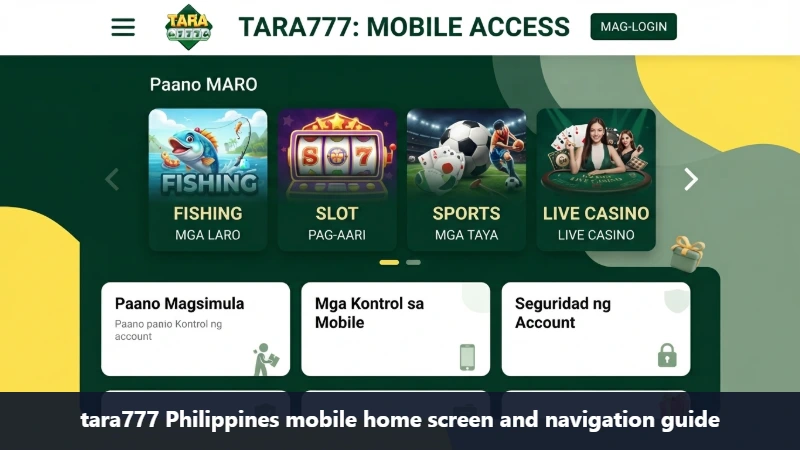
The first screen is the best place to understand how tara777 is organized. Instead of opening the first banner you see, spend a short moment checking the visible sections and deciding what you want to do during the session.
For Filipino mobile users, a simple structure works well:
| Area | Best for | What to check first |
| Main lobby | First-time navigation | Category labels and menu layout |
| Game sections | Short or longer sessions | Rules, controls, session pace |
| Account area | Profile and transaction actions | Current status and active instructions |
| Mobile access | Android, iPhone, browser | Current route and device prompts |
| Promotions | Extra account offers | Eligibility and current conditions |
A practical starting routine is:
- Open the current tara777 access route.
- Enter the main lobby.
- Choose one visible section you already understand.
- Read the information shown on screen.
- Complete one activity before switching areas.
- Return to the lobby when you want to explore another section.
Mas madaling sundan ang flow kapag one section at a time.
Learn One Game Screen Before Moving Around
A common mobile habit is to switch quickly between different screens. For tara777, we prefer a simpler approach: learn one screen first, then move on.
Check the Controls Before Starting
Before you begin, look for:
- Main action buttons
- Session or stake controls shown on screen
- Rules or help information
- Balance display
- Any timer or round status
- Settings related to the current game
Bago ka mag-start, decide how long you want to stay in that section. This helps you keep the session focused.
A good first-session routine is:
- Choose one game section.
- Read the controls.
- Set your session time.
- Start with one screen only.
- Check your current status after a few actions.
- Return to the lobby when the planned session ends.
This keeps tara777 easier to understand, especially on a smaller screen.
Use Time as Part of Your Session Plan
Mobile sessions can move quickly. One of the simplest ways to stay organized is to decide your session length before you begin.
For example, you can:
- Set a start time
- Choose one section
- Review your activity halfway through
- End the session at the time you planned
Hindi kailangan complicated. A clear time limit makes the tara777 experience easier to manage and helps you avoid mixing too many activities at once.
Mobile Navigation: Keep the Route Easy to Remember
For many Filipino users, the phone is the main device for accessing online entertainment. That makes navigation especially important.
Android Users
For Android, use a familiar route and follow the device prompts step by step.
A practical flow is:
- Open the current mobile page.
- Check the tara777 name and branding.
- Review the available access option.
- Follow the device prompts.
- Return to the main screen.
- Confirm that the sections are easy to find.
Keep device protection active while using mobile access. If Android shows a system message, read the details before continuing.
iPhone Users
For iPhone, Safari can be a simple starting point.
Use this flow:
- Open Safari.
- Enter the current tara777 route.
- Review the main page.
- Follow the instructions shown by the device.
- Return to the lobby.
- Choose the section you need.
Kung may device prompt, basahin muna bago mag-proceed. The goal is to keep the mobile route easy to repeat next time.
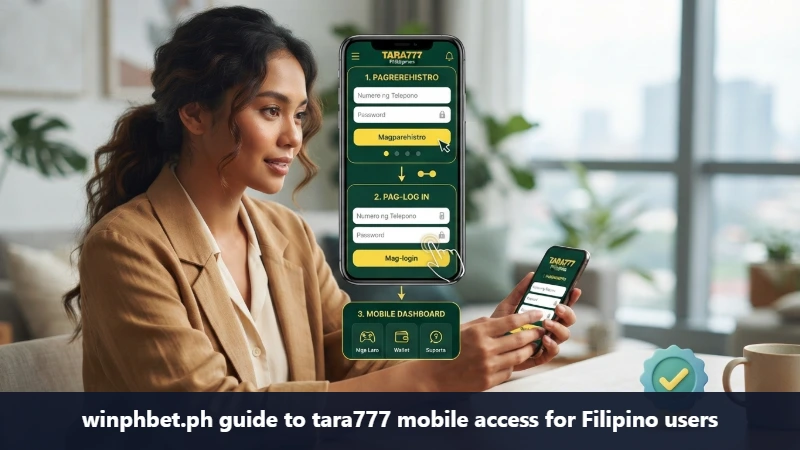
Browser Access Works Well for Casual Sessions
If you only use tara777 occasionally, browser access can be convenient.
Walang extra app file na kailangan mong i-manage. Open the current page, enter the lobby, and go directly to the section you need.
Browser use is especially practical when you want a quick session and prefer a simple path from the home screen to the main content.
If you switch between the browser and another app during the session, return to the account or activity screen and check your latest status before continuing.
Keep Account Actions Separate From Gameplay
At winphbet.ph, we prefer separating gameplay from account actions. Finish your current activity first, then move to the account area for payment, profile, or transaction steps.
This keeps the tara777 mobile flow cleaner.
Check the Current Account Screen
Before starting an account action, review:
- The method currently shown
- Amount or input fields
- Current instructions
- Information you entered
- Status after completion
Use the current screen as your practical reference.
Keep a Simple Transaction Record
After completing an account action, save the basic details shown on screen:
- Amount
- Date
- Time
- Reference number
- Current status
These details make your account history easier to review later.
Ingat sa account details. Keep passwords, OTPs, PINs, and full wallet credentials private.
Handle PHP Transactions Step by Step
For Filipino users, PHP account actions are easier to manage when each step is checked before moving on.
A clean flow is:
- Open the account or cashier area.
- Choose the method currently displayed.
- Review the amount information.
- Enter the PHP amount carefully.
- Check the current transaction details.
- Complete the corresponding mobile-wallet or banking step.
- Return to the account screen.
- Review the latest status.
This approach keeps tara777 account activity easy to trace.
If you move between the gaming page and another mobile app, return to the account area and confirm the latest transaction status before starting a new action.
Promotions: Read the Conditions After Choosing Your Session
Promotions are easier to understand when you already know what type of session you want.
We recommend choosing your activity first, then opening the promotions section.
What to Check
Review:
- Eligibility
- Applicable category
- Required action shown
- Turnover conditions
- Campaign period
- Claim process
- Account conditions
Mas practical kapag aligned ang offer sa original plan mo. If your session is already focused, it becomes easier to understand whether a promotion fits.
For tara777 users, this keeps the promotion as an extra feature instead of making it the starting point of the session.
A Practical tara777 Routine for Filipino Users
We find it useful to organize the whole session into four stages: choose, use, check, finish.
Stage 1: Choose
Decide what you want to do before opening several screens.
Pick one category or account action.
Stage 2: Use
Stay in that section and learn the controls.
Stage 3: Check
Review your time, account status, and recent activity when needed.
Stage 4: Finish
Return to the lobby or account page and review the latest status.
A complete routine can look like this:
- Enter the main lobby.
- Choose one section.
- Read the visible instructions.
- Set your session time.
- Start one activity.
- Review your status during the session.
- Open account functions when needed.
- Check promotion conditions separately.
- Return to the lobby.
- Review your latest account activity.
Simple lang, but it keeps each action in the right place.
What We Focus on When Introducing tara777
From our point of view at winphbet.ph, a useful guide should help readers understand what to do on screen.
We focus on practical points:
- How to read the main lobby
- How to choose one section
- What to check before starting
- How to keep Android and iPhone access simple
- How to separate gameplay from account actions
- How to keep transaction records organized
- How to review promotions after choosing a session
For tara777, the easiest experience comes from learning the interface step by step.
Hindi kailangan kabisaduhin lahat sa first visit. Start with one section, understand how it works, then expand when you are ready.
Frequently Asked Questions
Where should I start on tara777?
Start from the main lobby. Choose one section you already understand, read the visible instructions, and learn the controls before moving to another area.
What is a good setup for a short mobile session?
Choose one section, set your session time first, then review your activity halfway through.
How can Android users keep access simple?
Use one familiar current route, review the product screen, follow the device prompts, and return to the same lobby after setup.
Is browser access useful for occasional users?
Yes. Browser access keeps the route simple and works well when you prefer opening the current page without managing another app file.
What should I keep after a PHP transaction?
Keep the amount, date, time, reference number, and latest transaction status. These details make account history easier to follow.
When should I check promotions?
Check them after choosing your activity or session type. Then review the conditions that match your plan.
How can I keep a longer tara777 session organized?
Use one section at a time, review your session time regularly, and handle account actions separately from gameplay.
Finish With a Quick Account Review
Before leaving tara777, we recommend one final check.
Return to the main lobby or account screen and review your latest activity. If you handled a PHP transaction or moved between several mobile apps during the session, check the current status before closing the page.
Sandali lang ito, but it helps keep the next session easy to continue because you already know where the previous one ended.
Conclusion
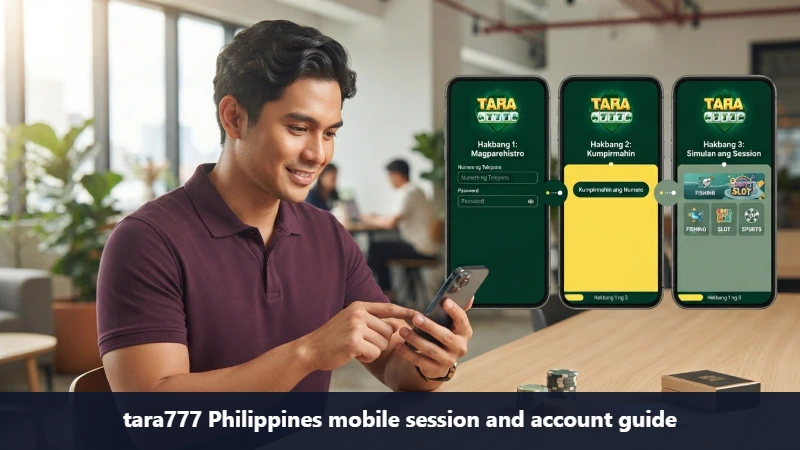
tara777 gives Filipino mobile users a practical way to organize a session from the main lobby to mobile access, account actions, PHP transactions, and promotions. At winphbet.ph, our focus is to keep that journey simple and easy to follow.
Bago ka mag-start, choose one section, set a comfortable session plan, and learn the controls first. Keep gameplay, account actions, and promotions in separate steps, then finish with a quick status review. With a clear routine, tara777 becomes easier to use on Android, iPhone, or browser from the first screen to the end of the session.